Blend + Composite Reference
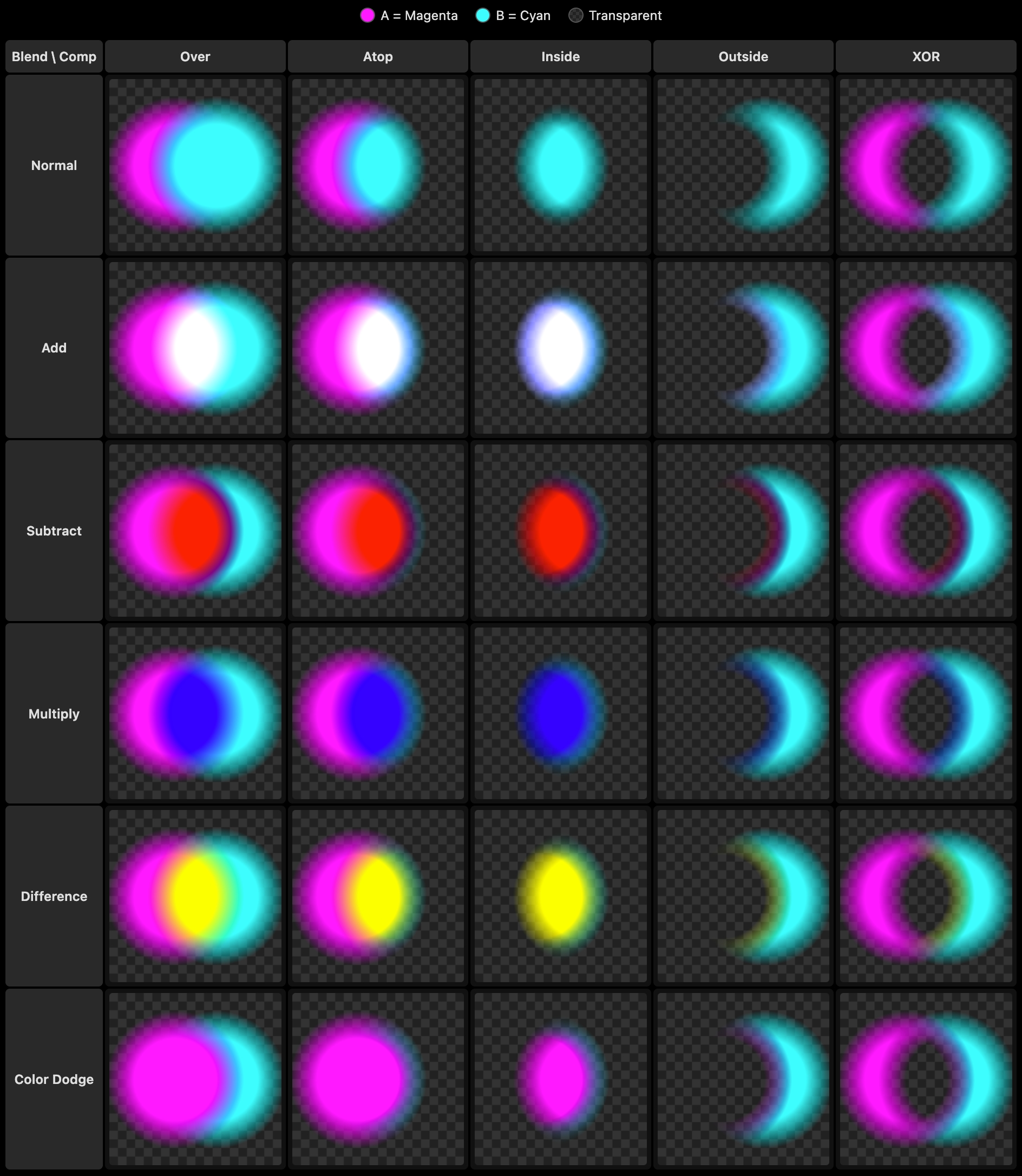
Two overlapping soft circles illustrate how Chromatose combines two Generators (A = Magenta, B = Cyan) using every blend mode + composite operator combination.
Supported Composite Modes
- Over - Places the current layer over what’s beneath wherever its pixels have opacity.
- Atop - Shows the current layer only where lower layers already have content; outside that area the lower layers remain visible.
- Inside - Keeps only the portion of the current layer that overlaps the opaque area of lower layers.
- Outside - Keeps only the portion of the current layer that falls outside the opaque area of lower layers.
- XOR - Displays pixels where either the current layer or the layers below are opaque, but not where both overlap, creating a cut-out look.
Supported Blend Modes
- Normal - Replaces the underlying pixels with the current layer.
- Add - Adds color channels, brightening the result like stacked light.
- Subtract - Subtracts the top layer’s channels from the bottom layer, darkening or inverting areas.
- Multiply - Multiplies channels, darkening and mixing colors like overlapping gels.
- Difference - Shows the absolute difference between layers, yielding high-contrast results.
- Color Dodge - Divides the bottom layer by the inverted top layer. This lightens the bottom layer depending on the value of the top layer: the brighter the top layer, the more its color affects the bottom layer.
Intersection Colors
Generator A (bottom layer) = Magenta (R: 1, G: 0, B: 1),
Generator B (top layer) = Cyan (R: 0, G: 1, B: 1):
| Blend | Result | Color |
|---|---|---|
| Normal | (0, 1, 1) | Cyan |
| Add | (1, 1, 1) | White |
| Subtract | (0, 1, 0) | Red |
| Multiply | (0, 0, 1) | Blue |
| Difference | (1, 1, 0) | Yellow |
| Color Dodge | (1, 0, 1) | Magenta |